WordPress Plugins That Assume Your Directory Structure
 Ben Word
WordPress has supported customizing your directory structure for nearly twenty years. You can rename your wp-content directory. You can install WordPress in a subdirectory. These are documented and supported features.
There’s still lots of plugins that completely ignore this and hardcode paths that only work on a default install.
If you’ve ever used Bedrock, managed WordPress with Composer, or moved WordPress into its own directory for a cleaner project root, you’ve probably run into this. A plugin that works fine on a vanilla install will break on yours.
What does a non-standard install look like?
A “standard” WordPress install puts everything in one directory with wp-content sitting alongside wp-admin and wp-includes. WordPress gives you the tools to change this:
WP_CONTENT_DIRandWP_CONTENT_URLlet you rename or relocate your content directory entirely.- Installing WordPress in a subdirectory (like
/wp/) keeps core files separate from your project root.
People do this for good reasons: cleaner project structure, Composer-based dependency management, improved security, or simply better organization. Bedrock installs WordPress in a wp/ subdirectory and moves the content directory to app/ (Radicle uses content/, which Bedrock v2 will be adopting).
The three most common offenders
Hardcoded wp-content paths
This is the most widespread problem. Plugins reference /wp-content/ as a literal string — in PHP includes, in JavaScript, in CSS, in generated URLs — instead of using the constants and functions WordPress provides.
// Wrong
$path = ABSPATH . 'wp-content/plugins/my-plugin/lib/foo.php';
$url = site_url('/wp-content/plugins/my-plugin/assets/style.css');

// Right
$path = plugin_dir_path(__FILE__) . 'lib/foo.php';
$url = plugins_url('assets/style.css', __FILE__);
WordPress gives you WP_CONTENT_DIR, WP_CONTENT_URL, plugin_dir_path(), plugins_url(), content_url(), and more. There’s no reason to hardcode the path.
Directly including wp-load.php
Some plugins try to bootstrap the WordPress environment by directly including wp-load.php — usually in standalone PHP files that handle AJAX requests, cron jobs, or file processing outside the normal WordPress lifecycle.
// Wrong
require_once('../../../wp-load.php');

// Also wrong
require_once(dirname(__FILE__) . '/../../../wp-load.php');
This is fragile in any install, but it’s guaranteed to break when WordPress lives in a subdirectory. The relative path to wp-load.php changes, and the plugin has no way to find it.
The fix is to stop doing it entirely. WordPress has proper APIs for everything these standalone files are trying to do, including using the WordPress REST API.
Assuming WordPress lives in the root directory
Some plugins hardcode paths like /wp-admin/ or /wp-includes/ relative to the site root, assuming WordPress core files live at the top level. When WordPress is installed in a subdirectory (like /wp/), these paths point to nothing.
// Wrong — assumes WordPress is in the root directory
home_url('/wp-admin/admin-ajax.php');
home_url('/wp-includes/js/some-script.js');

// Better — but still assumes wp-admin and wp-includes paths
site_url('/wp-admin/admin-ajax.php');
site_url('/wp-includes/js/some-script.js');

// Best — uses the dedicated functions
admin_url('admin-ajax.php');
includes_url('js/some-script.js');
WordPress provides admin_url(), includes_url(), and site_url() specifically for this. Any time you’re building a path to a core file, use these functions instead of assuming the directory structure.
How big is the problem?
Thanks to Veloria, you can search the entire WordPress plugin directory with regex and see for yourself.
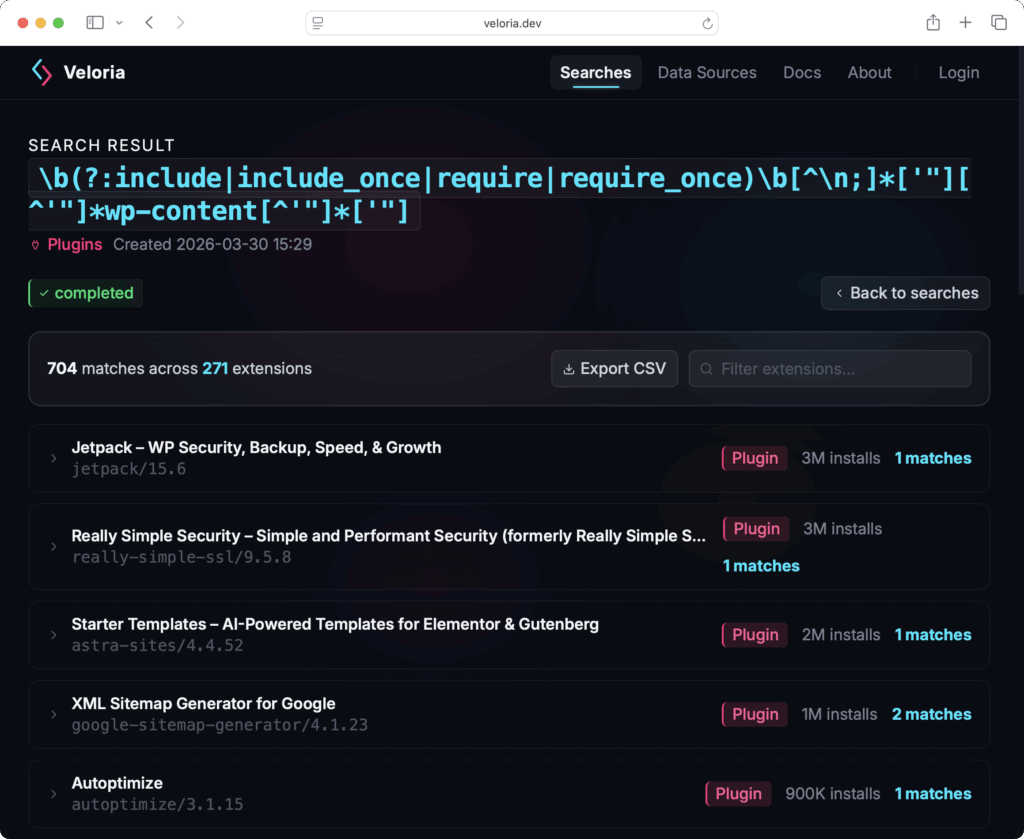
Note: not every match for these searches are a real problem and some results will be false positives. Such as references to wp-content in readme files, hardcoded URLs pointing to external domains, or sample data. But dig into the results and you’ll find plenty of legitimate offenders.
Veloria also offers an MCP server that you can use with AI tools like Claude Code to programmatically search plugin code, inspect matches in context, and filter out false positives.
Notable offenders
| Plugin | Active Installs | Issue |
|---|---|---|
| Really Simple Security | 3,000,000 | Includes wp-load.php in download.php and system-status.php |
| Starter Templates | 2,000,000 | require_once ABSPATH . 'wp-content/themes/astra/functions.php' |
| Complianz GDPR | 1,000,000 | Bootstraps WordPress via wp-load.php in system-status.php |
| Google Sitemap Generator | 1,000,000 | require_once '../../../wp-load.php' and hardcoded wp-content includes |
| W3 Total Cache | 900,000 | require_once __DIR__ . '/../../../../wp-load.php' in pub/sns.php |
| NextGEN Gallery | 400,000 | Entire bootstrap file dedicated to finding and loading wp-load.php |
| LoginPress | 200,000 | require ABSPATH . '/wp-load.php' in login template |
| Burst Statistics | 200,000 | Standalone endpoint.php that hunts for wp-load.php |
| Matomo Analytics | 100,000 | Hardcoded wp-content paths throughout — views, asset manager, system report |
Hardcoded wp-content in includes
Search for plugins that include or require a path containing wp-content:
\b(?:include|include_once|require|require_once)\b[^\n;]*['"][^'"]*wp-content[^'"]*['"]Hardcoded wp-content in URLs and paths
The problem is even bigger when you look beyond just include/require statements. Search for wp-content being concatenated or embedded in strings more broadly:
['"/]wp-content/Direct wp-load.php includes
Search for plugins that try to bootstrap WordPress by including wp-load.php:
\b(?:require|require_once|include|include_once)\b\s*(?:\(\s*)?[^\n;]*['"][^'"]*wp-load\.php['"]\s*\)?This surfaces another pile of plugins that will break on any non-standard directory structure.
You can run all of these searches yourself on Veloria — it’s a full regex search across the WordPress plugin directory.
What plugin authors should do
If you maintain a WordPress plugin, this is straightforward to fix:
- Search your own codebase for literal
wp-contentstrings. Replace them with the appropriate WordPress constant or function (WP_CONTENT_DIR,plugins_url(),content_url(), etc.). - Remove any direct includes of
wp-load.php. - Replace hardcoded paths to
/wp-admin/and/wp-includes/withadmin_url(),includes_url(), and similar functions. - Use
site_url()instead ofhome_url()when referencing WordPress core files.home_url()points to your front-end URL, not where WordPress is installed. - Test on a non-default install. Set up Bedrock and run your plugin against it. If it works on Bedrock, it’ll work anywhere.